iOS vulnerability research with kernel debugging and AI agents built in
Jailbroken iOS and rooted Android virtual devices on demand, with system- and kernel-level introspection, snapshots, and AI agents that take the repetitive work. For authorized, defensive research.
A research environment in the cloud: no rare physical devices to hunt down, and no waiting on hardware access before your iOS vulnerability research can start.
Access is reviewed. Authorized research only.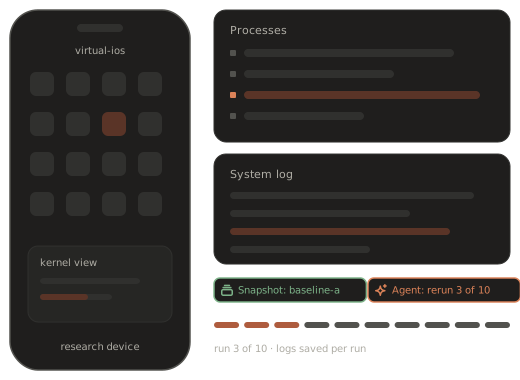
Why mobile vulnerability research stalls
Good research ideas wait on hardware, setup and repetition.
The right device is hard to get, and harder to keep.
iOS vulnerability research often depends on a specific device and OS version, and physical phones update, break or simply run out.
Access lags behind new releases.
A jailbroken iPhone for the release you care about may not exist yet when the research needs to start.
Reproducing means rebuilding.
Getting back to the state behind a crash can mean rebuilding a setup by hand, again.
Findings wait for validation.
When each repeat run takes hours of attention, promising leads sit untested.
iOS vulnerability research tools in one environment
What a research team gets, without building a lab.
Testing one app rather than the OS? See app pentesting. Working with suspicious samples? See malware analysis.
Virtual iOS and Android devices.
Research devices in the cloud; tell us which OS releases your work needs.
Jailbreak and root on demand.
Start from a device with the access level research requires.
System and kernel introspection.
Kernel debugging and system-level visibility on virtual devices.
Files, processes and traffic.
Inspect the file system, running processes and network traffic as the device works.
Snapshots and clones.
Preserve an exact device state, branch it, and clone it as a baseline.
Your tools and an API.
Works with the research tools you already use, with API access for automation.
From crash to validated finding
Five stages of vulnerability research, with less time spent getting back to where you were.
Crash triage is where research time disappears. Each stage below is about an outcome, not a procedure; snapshots and agents shorten the parts that repeat.

Start from a known state.
Every investigation begins from a saved device snapshot, so you know exactly what was running.
Snapshots remove the rebuild.
Reproduce the behaviour reliably.
Rerun the same input from the same state until you trust the result.
An agent can do the reruns and keep count.
Observe what happened below the app.
Use system- and kernel-level visibility to see what the device did, not only what the app showed.
Logs and evidence are collected per run.
Decide whether it matters.
Judge severity and reproducibility with evidence in front of you rather than a hunch.
The agent’s summary gives you the run history; the call is yours.
Package it for the fix.
Hand the vendor or your internal fix team a clear write-up with evidence and the snapshot behind it.
A draft is ready when you are.
AI agents on the research bench
Repetition is the agent’s job. Judgment stays with the researcher.
recuritylab has an MCP server and an API built in, so an AI agent can operate the virtual device directly: restore a snapshot, run a test case, collect the logs, and report back. You set the task in plain language:
“Restore the saved state, rerun the test case ten times, and summarise which runs crashed, with the logs attached.”
The agent works through the runs on its own while you keep working on the analysis. When it finishes, you get a summary and the evidence, not a verdict. Interpreting the behaviour, judging severity and deciding how to disclose remain the researcher’s work.
The agent
- reproduction runs
- evidence and log collection
- run summaries
- draft triage notes
The researcher
- analysis
- severity and impact
- validation
- coordinated disclosure
Snapshots: rewind instead of rebuild
Keep the exact state behind a finding.
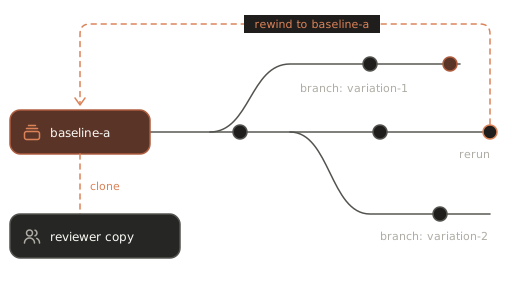
On a virtual iPhone for security research, state is something you can save. Take a snapshot when the device shows interesting behaviour, then return to it whenever you need to look again. Branch from it to try variations without losing the baseline. When a teammate needs to review or validate your result, a clone gives them the same starting point; ask us how team sharing fits your setup.
- Save the state behind interesting behaviour
- Branch to try variations, keep the baseline
- Clone it so reviewers start from the same point
- Come back to it when you need to
Works with your research toolkit
Bring your debuggers, disassemblers and scripts.
Jailbreak and root access mean your own tools run on the device instead of around it. Keep the debugger, reverse engineering suite and scripts you already rely on, and automate the rest through the API, or let an agent call it over MCP. Want to confirm a specific tool? Bring it to the demo. Bringing new researchers up to speed? Ask about training.
API overview- Your debugger and reverse engineering tools
- Your own scripts and automation
- API and MCP access for everything repeatable
Physical devices vs virtual research devices
Why researchers move from a drawer of phones to virtual devices.
A physical device is real hardware but hard to keep at the right access level. A simulator or emulator is convenient but is not built for deep system research. The table compares categories, not vendors; see iOS Simulator and Android emulator for detail.
| Access level | System visibility | Repeatable state | Time to a ready device | Automation / agents | Team sharing | |
|---|---|---|---|---|---|---|
| Physical device | Depends on model and OS release | Limited without jailbreak or root | Manual re-setup | Procurement and setup | Bring your own | Pass the device around |
| iOS Simulator / Android emulator | Limited | App-level, not a full device | Partial | Quick on a workstation | Bring your own | Per workstation |
| recuritylab virtual devices | Jailbreak and root on demand | System- and kernel-level introspection | Snapshots and clones | Ask us | AI agents + MCP built in | Ask us |
Deploy where your research must live
A mobile vulnerability research platform has to fit your rules, not the other way round. recuritylab offers flexible deployment options, including isolated environments — ask us. Tell us where research data such as snapshots and logs must stay, and we’ll discuss the setup that meets that requirement. Read more for government, for enterprise and on security.
Authorized research only
recuritylab is for research on software you own or are authorized to test. Findings are meant to be reported and fixed through coordinated disclosure. Every account starts with a demo and a review of the request, use is governed by our acceptable use policy, and we may decline requests that don’t fit it.
Acceptable use policyFAQ
What iOS vulnerability research tools and kernel debugging support does a team need?
At the environment level: devices on the OS releases you study, jailbreak or root access, system- and kernel-level introspection and debugging, file, process and traffic inspection, and a way to save and return to exact device states. recuritylab brings these together on virtual iOS and Android devices, with AI agents for the repetitive runs.
Does recuritylab support kernel debugging on virtual iOS devices?
Yes. System and kernel introspection and debugging are part of the platform. For the specifics your research depends on, such as OS releases or particular workflows, ask us in the demo.
Do I need a physical jailbroken iPhone?
No. Virtual devices come with jailbreak or root access on demand, so you don’t have to source, prepare and maintain physical research phones.
Is Android supported too?
Yes. You work with virtual iOS and Android devices on the same platform, with the same snapshots, introspection, agents and API.
What do the AI agents do in vulnerability research?
The repetitive parts: restoring states, rerunning test cases, collecting logs and evidence, and summarising the results. They operate the device over the built-in MCP server or the API. Analysis, severity calls and disclosure stay with the researcher.
Can we run it in an isolated environment?
recuritylab offers flexible deployment options, including isolated environments — ask us. Tell us your requirements in the demo request and we’ll discuss what fits.
Who can get access?
Teams doing authorized, defensive research. Every account starts with a demo and a review of the request, and use is governed by our acceptable use policy. There is no self-serve signup and no published pricing.
Spend your time on the finding, not the setup
Access is on request and set up after a demo. We don’t publish pricing.
Book a demo