iOS app pentesting, as guided hands-on scenarios
Practise iOS and Android app security testing on deliberately vulnerable demo apps, running on ready virtual devices, with an AI agent that can guide you, explain what it finds and draft a report.
Looking for an iOS app pentesting tutorial, step by step, without preparing a test phone first? Each guide is a mobile app pentesting practice lab you open in the cloud.
For authorized learning on the scenario demo apps only.Step zero, solved
Most tutorials start with “first, get a jailbroken iPhone.” Ours start with a device that is ready.
Almost every pentesting tutorial assumes you already own a suitable test phone with jailbreak or root access. Preparing one is slow, fragile and tied to specific hardware and OS versions. With recuritylab, each scenario starts on a virtual iOS device or virtual Android device in the cloud, with jailbreak or root access available. Snapshots let you return to a clean state and try again whenever you need to.
Usual tutorial path
- find a compatible phone
- prepare jailbreak or root access
- set up your lab
- hope it still works next week
With recuritylab
- pick a scenario
- start a ready virtual device
- practise
- reset from a snapshot
How guides work
An overview here; the full step-by-step walkthroughs live inside the platform.
Pick a scenario
Choose by platform, level and focus area.
Start a ready device
A virtual iOS or Android device, with the scenario’s demo app ready to install.
Work it your way
Go solo, ask the AI agent to guide you, or let the agent run it and review what it found.
Get a report
Findings are summarised for you to review and keep.
AI-agent mobile pentesting works best as a partnership: the agent does the legwork and explains it, you make the calls. Step-by-step walkthroughs open inside recuritylab once access is granted.
Scenario library: intentionally vulnerable iOS and Android apps
Each scenario runs on a fictional demo app built to be tested. Pick one, see what you will learn.

Mobile app pentesting fundamentals
Learn how a mobile app assessment is structured, from mapping the app to writing up findings, on an intentionally vulnerable iOS app and its Android counterpart.
Reviewing local data storage
Learn where mobile apps keep data on the device, how to recognise sensitive data stored insecurely and how to describe the risk clearly.

Network traffic and API communication
Learn how to observe what an app sends to its backend and how to judge whether that communication is adequately protected.
Authentication and session handling
Learn the common weak points in how mobile apps sign users in and keep sessions, and how to report them so developers can fix them.
Agent-led assessment
Let the AI agent assess a demo app, then review its report: what it found, how it reached each finding and what a human should verify.

Introduction to binary and runtime inspection
Learn what an app’s compiled code and runtime behaviour can reveal during an assessment, at a concept level, on an intentionally vulnerable iOS app.
What you will practise
Scenarios follow the areas of the OWASP Mobile Application Security Verification Standard.
OWASP MASVS and its companion testing guide, the MASTG, are the public, community-maintained reference for mobile app security testing. We use their areas to organise scenarios so your practice lines up with how assessments are usually scoped and reported. recuritylab is not certified or endorsed by OWASP; we simply use the standard as a shared vocabulary.
| Area | Fundamentals | Data storage | Network | Authentication | Agent-led | Binary & runtime |
|---|---|---|---|---|---|---|
| Data storage | Covered in Fundamentals | Covered in Data storage | Covered in Agent-led | |||
| Network communication | Covered in Fundamentals | Covered in Network | Covered in Agent-led | |||
| Authentication | Covered in Fundamentals | Covered in Authentication | Covered in Agent-led | |||
| Platform interaction | Covered in Fundamentals | Covered in Agent-led | Covered in Binary & runtime | |||
| Code quality | Covered in Binary & runtime | |||||
| Resilience | Covered in Binary & runtime |
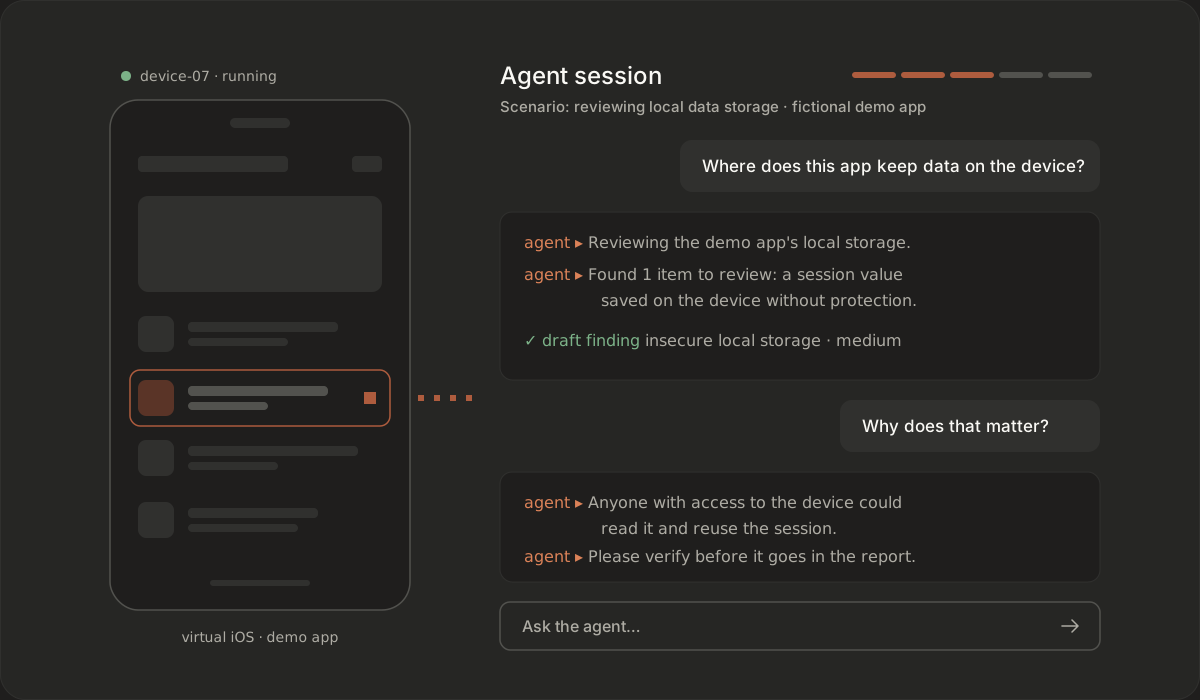
The AI agent can explain what it is doing and why, answer your questions in plain language and summarise what it found. That helps learners understand each step, and helps teams turn a scenario into a repeatable check. Agents work through recuritylab’s built-in MCP server, so your team can also connect its own MCP-compatible AI client. You stay in control throughout: you decide what the agent does and review every finding before it counts.
For teams and classrooms
Guides work for onboarding new team members and as lab material in courses. Universities can apply to our academic program, and instructor-led training is available on request for teams that want a structured course.
TrainingUniversity programFAQ
Do I need a physical iPhone or Android phone?
No. Every scenario runs on a virtual iOS or Android device in the cloud, with jailbreak or root access available. You don’t need to buy, prepare or maintain test hardware, and you can reset the device from a snapshot whenever you want a clean start.
Are the demo apps safe to test?
Yes. They are deliberately vulnerable apps built for practice and provided with each scenario. Use guides only on these demo apps or on apps you are explicitly authorized to test, in line with our Acceptable Use Policy.
Do I need prior pentesting experience?
Not for the introductory scenarios. Levels run from intro upward, so newcomers can start with the fundamentals and the agent’s explanations, while experienced testers can go straight to the focus areas they want to sharpen.
Can the AI agent do the scenario for me?
It can run the scenario, guide you through it or assist when you get stuck. Whichever way you choose, you review the findings yourself, because judging what matters is the skill you are building.
Where is the step-by-step iOS app pentesting tutorial?
The full step-by-step walkthrough for each scenario lives inside recuritylab once you have access. This page and the scenario pages give an overview: what each scenario covers and what you will learn.
Can I use guides for a class or a team?
Yes. Teams use them for onboarding and practice, and educators can use them as course labs. See training for instructor-led courses and the university program for academic use.
Start your first scenario on a ready virtual device
Access is on request. Book a demo to see the scenarios and talk through access for you or your team, on iOS and Android.
Book a demo