The Android Emulator for penetration testing — and a managed alternative
Many testers start with the Android Emulator for penetration testing, and it is a solid starting point. But security teams spend real time building and maintaining a rooted, instrumented lab on every tester's machine. recuritylab offers managed virtual Android and iOS devices for authorized security testing, with root access and AI agents built in.
Last verified ; sources at the bottom.Using the Android Emulator for penetration testing
Credit where it is due: the Android Studio emulator does a lot, and many pentesters start with it.
- Many devices, no hardware. It simulates Android devices on your computer across phone, tablet, Wear OS, TV and Automotive OS profiles and many API levels [1]. It comes with Android Studio [7].
- Local and isolated per AVD. It runs on your own machine, and each Android Virtual Device (AVD) has its own private storage for user data [1].
- Root on the right image. A rooted emulator is available out of the box on Android Open Source Project (AOSP) system images without Google apps, through the documented
adb rootfeature. Images that include Google Play do not offer this [2]. - Snapshots. Quick Boot and saved snapshots capture and restore full device state, with some documented limitations [3].
- Traffic and headless use. The emulator can route TCP connections through an HTTP/HTTPS proxy, capture network packets to a file, and run without a window on servers [5].
- Hardware acceleration. Performance relies on the host's hypervisor, such as WHPX on Windows, KVM on Linux or Hypervisor.Framework on macOS [4].
Where a DIY emulator lab gets hard
The search results for this topic are almost all setup tutorials, and they show where the time goes. Building an Android pentest lab yourself is possible, but it rarely stays simple.
- Root vs Google Play. The system images closest to a consumer phone, the ones with Google Play, are the ones you cannot root with
adb root[2]. Testers fall back on community tooling that has to be kept working with each new image. - Nested virtualization. You can't run a VM-accelerated emulator inside another VM, such as one hosted by VirtualBox, VMware or Docker. It may also conflict with other virtualization software on the same host [4]. That complicates shared lab VMs and some CI hosts.
- Host resources, per tester. Google recommends at least 16 GB of RAM and 16 GB of disk for the best experience, and more for higher API levels [1].
- Consistency. Typically each tester rebuilds the lab, so results can vary with machine and tool versions.
- Android only. There is no iOS in the same workflow. For iOS, see /compare/ios-simulator.
Android Emulator vs recuritylab for security testing
Android Emulator cells cite Google's developer documentation, with a source number for each. recuritylab cells describe the platform in general terms. Specifics such as versions and deployment are covered in the demo.
| Criterion | Android Emulator (AVD) | recuritylab |
|---|---|---|
| Where it runs | Locally on your computer [1] | Managed in the cloud; other deployment options — ask us |
| How you get it | Included with Android Studio [7] | Book a demo |
| Platforms | Android: phone, tablet, Wear OS, TV, Automotive OS [1] | Android and iOS |
| Root access | AOSP images via adb root; not on Google Play images [2] | Root (Android) and jailbreak (iOS) built in |
| Snapshots | Quick Boot and saved snapshots, with documented limits [3] | Snapshots and cloning |
| Traffic inspection | Proxy option and packet capture to file [5] | Built-in network traffic monitoring |
| System / kernel introspection | Standard Android tooling such as adb [2] | System and kernel inspection and debugging |
| Team use and scale | One tester's machine; host resources per instance [1] | Cloud devices shared by the team; discuss your scale |
| Runs inside a VM / some CI hosts | Not VM-accelerated inside another VM [4] | No local virtualization needed |
| AI agents / MCP | Not in the emulator; Android Studio's Gemini agent can interact with a running app and connect to MCP servers [8] | AI agents and an MCP server built in |
A ready-made Android pentest environment
recuritylab gives your team a virtual Android device for app pentesting with the lab already built. Devices come with root access ready. Take a snapshot before a test case and return to a clean state afterward. Network traffic monitoring and file-system and process inspection are part of the platform, not something each tester assembles. The platform is designed to work with the research tools your team already uses, and the same platform covers iOS.
Every tester works from the same starting point, without building a local lab. To see how environments are separated and protected, visit /security.
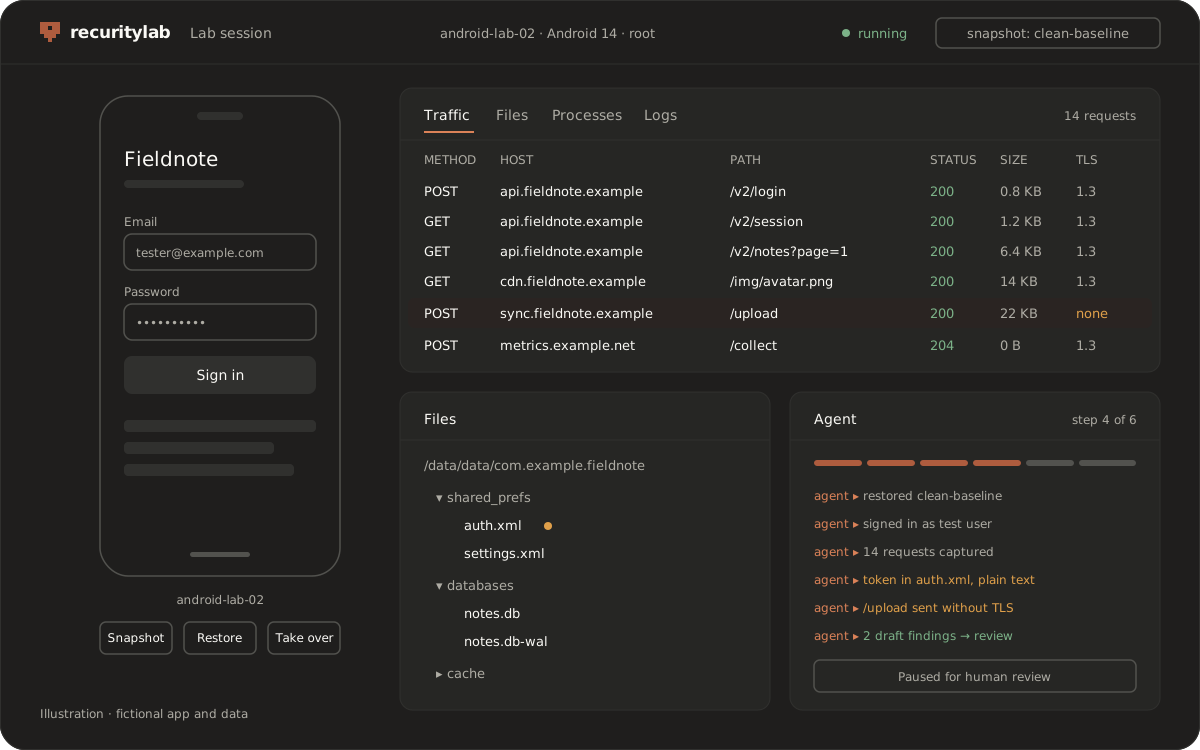
AI agents instead of setup scripts
Search for this topic and you will find AI-agent "skills" written just to stand up an emulator lab: install the SDK, create the AVD, root it, wire up tooling, troubleshoot. Android Studio's own Gemini agent can also deploy an app to a connected device and interact with it, for development work [8]. On recuritylab, a rooted device is ready before the agent starts, so the agent can spend its time on the security test itself.
Through the built-in MCP server and API, an agent explores the app, exercises its flows and watches traffic and storage. It collects evidence as it goes and drafts a report for human review. That is automated Android pentesting with a person in charge: pause, roll back to a snapshot or take over at any point.
Agents work only on apps and targets you are authorized to test. See /legal/acceptable-use.
Android Emulator or a managed platform: which should you use?
Choose the Android Emulator if:
- You are developing the app and need quick local checks.
- You are learning, or practicing on open-source vulnerable apps on your own machine.
- You work alone and an AOSP image with
adb rootcovers your tests [2].
Look elsewhere if:
- You need broad physical-device coverage for QA. Google's Android Device Streaming connects Android Studio to remote physical devices in Google data centers [6], and device clouds such as BrowserStack serve the same need. See /compare/browserstack.
- You want Android-only virtual devices in the cloud or on desktop. See /compare/genymotion.
Choose recuritylab if:
- Your team needs a consistent, rooted, inspectable lab that everyone shares.
- You test iOS as well as Android.
- You want AI agents and MCP to do the repetitive part of the work.
FAQ
Can you use the Android Emulator for penetration testing?
Yes, with limits. The Android Emulator offers root on AOSP system images, snapshots, an HTTP/HTTPS proxy option and packet capture [2][3][5]. Its limits show up in Google Play images that can't be rooted, per-machine setup, nested-virtualization restrictions and the lack of iOS.
Can you root an Android Emulator image with Google Play?
Not through the documented route. Google's documentation offers elevated adb root privileges on AOSP system images without Google apps or services, not on Google Play images [2]. We don't cover workarounds here. If you need rooted devices without building and maintaining the lab yourself, that is what a managed platform is for.
Can the Android Emulator run in a virtual machine or in CI?
Google's documentation says you can't run a VM-accelerated Android Emulator inside another VM, such as VirtualBox, VMware or Docker [4]. It can run without a window on servers that have no display [5]. For VM acceleration, the host needs direct access to hardware virtualization [4].
How do I get the Android Emulator?
The Android Emulator ships with Android Studio, Google's official IDE for Android, which you download from Google's developer site [7].
Unlike the Android Emulator, does recuritylab support iOS too?
Yes. recuritylab provides virtual iOS devices with jailbreak access alongside virtual Android devices with root, on one platform. Ask us in the demo about the iOS and Android versions you need.
Can AI agents run Android security tests on recuritylab instead of an Android Emulator lab?
Yes. AI agents and an MCP server are built in. Agents drive rooted virtual Android devices through the scenario you describe and draft findings for human review. They are for authorized testing only.
How do I get access to a managed alternative to the Android Emulator?
Book a demo at /contact?type=demo. Every request is reviewed, and we set up access that fits your team.
Sources
Android Emulator facts come from Google's developer documentation. Google updates these pages often, so we re-check them before each update. Android, Android Studio and Gemini are trademarks of Google LLC. recuritylab is not affiliated with Google. Found something out of date? Tell us.
Last verified:
- Android Developers, Run apps on the Android Emulator https://developer.android.com/studio/run/emulator
- Android Developers, Create and manage virtual devices https://developer.android.com/tools/devices
- Android Developers, Emulator snapshots https://developer.android.com/studio/run/emulator-snapshots
- Android Developers, Configure hardware acceleration for the Android Emulator https://developer.android.com/studio/run/emulator-acceleration
- Android Developers, Start the emulator from the command line https://developer.android.com/studio/run/emulator-commandline
- Android Developers, Android Device Streaming https://developer.android.com/studio/run/android-device-streaming
- Android Developers, Download Android Studio https://developer.android.com/studio
- Android Developers, Gemini in Android Studio features https://developer.android.com/studio/gemini/features
Skip the lab setup — book a demo.
Book a demo