AI mobile app testing in your CI pipeline, on virtual devices
AI agents run functional and security checks on virtual iOS and Android devices for every build, each starting from a clean snapshot. No device lab, no device queue.
Give your pipeline a device it can trust and an agent that knows what to check, so the pull request gets QA and security feedback before anything ships.
Access is reviewed. Every account starts with a demo.
Why mobile CI stays flaky and blind to security
Most mobile CI/CD testing problems come from the test, the device or the gap between QA and security.
Scripts break on every redesign.
Scripted UI tests depend on selectors, so a renamed button can mean a failed build and an afternoon of upkeep. Flaky tests teach teams to ignore red builds.
Shared device farms mean queues.
Devices are busy when you need them, and you rarely know what state the last job left them in.
Runner emulators are a compromise.
Simulators and emulators on CI runners take time to start and don’t always behave like the devices your users carry.
Security sits outside the pipeline.
Security testing happens later, if at all, so the issues it would catch surface after release.
How it runs in your CI pipeline
Six steps from commit to evidence on the pull request.
Every run happens on virtual devices that start clean and are thrown away afterwards, so one build never inherits another build’s mess.
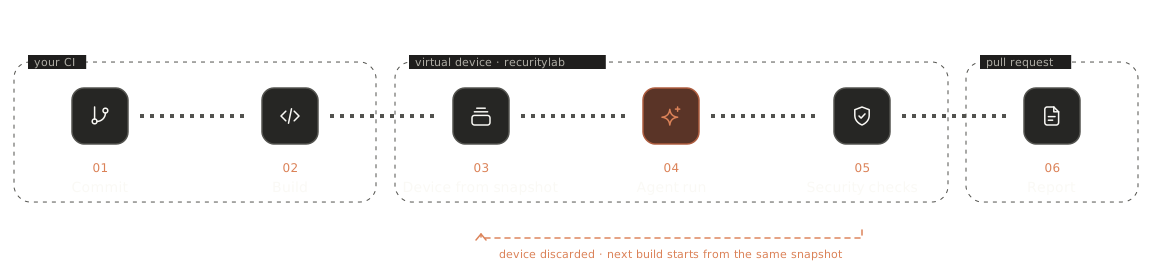
Your CI builds the app.
The IPA or APK is built as usual, then your pipeline hands it to recuritylab through the API or MCP.
A device starts from a known snapshot.
A virtual iOS or Android device starts from the state you saved, with the OS, settings and test accounts already in place.
The agent runs your scenarios.
The build is installed and an AI agent works through scenarios written in plain English. Want your existing test suite to run alongside? We’ll look at it with you in the demo.
Security checks run on the same device.
Where a check needs it, the device is jailbroken or rooted, so security testing doesn’t need a separate setup.
Evidence comes back.
Steps, screenshots, captured traffic and logs, plus an auto-generated report, go back to your pipeline for the team to review.
The device is discarded.
Nothing carries over. The next build starts from the same clean state.
What a pipeline step looks like
One run, start to finish.
Here is an illustrative run of a single pipeline step, shown as the agent’s own log. It is not an API reference: the actual integration is set up with you, and the API overview explains how devices and agents are reached. The shape stays the same every time: start clean, run the scenario, check what matters, report.
API overviewTests written as intent, not selectors
Describe what should happen. The agent works out how.
AI mobile app testing on recuritylab starts from natural language tests. You describe the journey and the expected outcome, and the agent reads the screen to carry it out on the device:
“Sign up with a new email, verify the welcome screen, then log out and confirm the session token is cleared.”
Because the scenario states intent instead of element IDs, it reads like the acceptance criteria your team already writes, and anyone can review it. Already have a suite you rely on? Bring your existing suite to the demo and we’ll look at how it fits next to agent scenarios.
- Scenarios in plain English, reviewable by anyone
- The agent works from what is on the screen
- Your existing suite: discussed in the demo
QA and security checks in the same run
Continuous mobile security testing, without a second pipeline.
QA device clouds can tell you whether the app works. Because recuritylab devices can be jailbroken or rooted and inspected, the same run can also ask security questions. That is mobile DevSecOps in practice: shift-left checks on every build, with the deeper manual work left to a pentest. These checks catch common regressions; they are not a full mobile application security assessment.
QA checks
- sign-up and login flows
- core journeys such as search or checkout
- expected screens and messages
- regressions after a UI change
Security checks
- does jailbreak or root detection behave as intended
- is sensitive data written to device storage
- is traffic sent in cleartext or to unexpected hosts
- do debug or logging builds leak secrets
Every build starts from the same device state
Flakiness often starts with the device. Snapshots take it out of the equation.
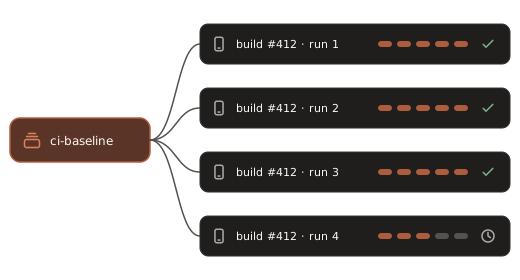
Set up a device once: the OS, settings, a signed-in test account and seeded data. Save it as a snapshot, and every CI run on virtual devices starts from exactly that state. When you need parallel testing, clone the same baseline so every run begins from the same point. Tell us the parallel capacity your pipeline needs and we’ll scope it with you.
- One saved baseline per app or test plan
- Every run starts from it, nothing carried over
- Clones of the same baseline for parallel runs
Fits your CI and your tools
If your CI can call an API, it can call a device.
recuritylab works from any CI that can call an API: the pipeline hands over a build, an agent runs on a virtual device, and results come back. The same devices are also available to agents over MCP, so agent-driven runs use the same interface. The platform overview covers the devices themselves. Tell us which CI system and test frameworks you use, and we’ll walk through the fit in the demo.
- Any CI that can call an API
- MCP for agent-driven runs
- Your CI and frameworks: reviewed in the demo
Virtual devices with agents vs emulators, device clouds and labs
Each option has a place. Here is where each one fits.
The table compares categories, not vendors. Some real-hardware features, such as cellular, camera or certain biometrics, may still call for physical devices; ask us about the features your tests depend on. For deeper comparisons, see Android emulator, iOS Simulator and BrowserStack.
| Start from a known state | Jailbreak / root for security checks | Boot or queue wait | Who maintains test scripts | Security checks in the pipeline | Hardware to maintain | |
|---|---|---|---|---|---|---|
| Emulators / simulators on CI runners | Partial | Limited | Start-up on every job | Your team | Separate tools | Your runners |
| Real device cloud | Device state varies | Generally not offered | Depends on availability | Your team | Separate tools | None |
| In-house device lab | Manual reset | Depends on model and OS release | Depends on who has the device | Your team | Separate tools | A device lab |
| recuritylab virtual devices with agents | Snapshots | Yes, on demand | Ask us | Agent scenarios in plain English | In the same run | None |
Results your team can act on
Evidence where the review happens.
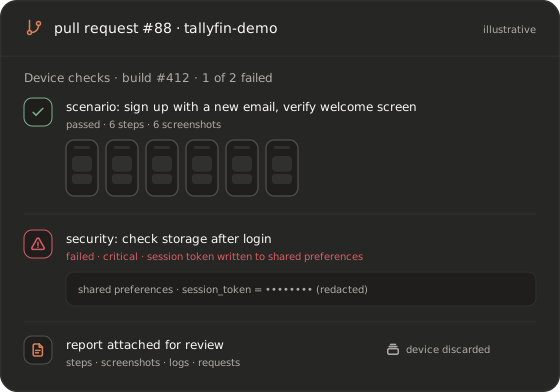
Every run ends with an auto-generated test report: the scenario steps the agent took, screenshots, logs and captured requests, with any security findings called out. Your pipeline gets a result it can act on, and reviewers see evidence instead of a bare red cross. How results reach the pull request, and which outputs your tooling needs, is set up with you after the demo. Rolling this out across many teams? See for enterprise.
- Per-step evidence: screenshots, logs, requests
- Security findings called out separately
- Output fitted to your pipeline during setup
FAQ
What is AI mobile app testing in a CI pipeline on virtual devices?
An AI agent runs your test scenarios, written in plain English, on virtual iOS and Android devices as part of each build. The device starts from a known snapshot, the agent drives the app and checks the outcome, and the evidence returns to the pipeline. On recuritylab the same run can include security checks.
Do I have to rewrite my existing tests?
Not to get started. Agent scenarios can sit next to the tests you already have. Bring your existing suite and framework to the demo, and we’ll look at how they fit together on the platform.
Virtual devices or real devices: which should CI use?
For most functional and security checks, a virtual device that starts from a clean snapshot gives repeatable runs without waiting for a shared physical device. Tests that depend on specific hardware features may still need physical devices. Tell us what your tests rely on and we’ll give you a straight answer.
Can the same pipeline run security checks?
Yes. Devices can be jailbroken or rooted, so the run can check storage, traffic and jailbreak or root detection alongside functional scenarios. These checks complement a full mobile pentest; they don’t replace it.
How do you keep CI runs from being flaky?
Every run starts from the same saved snapshot, so device state is no longer a variable, and each device is discarded afterwards. Scenarios describe intent rather than selectors, and the agent works from what is on the screen.
Will an AI agent replace QA engineers?
No. The agent takes the repetitive runs and evidence collection. QA engineers decide what to test, write and review the scenarios, and judge the results, with more time for exploratory testing.
How do I get access?
Book a demo. We review every request and set up access that fits your team. There is no self-serve signup and no published pricing.
Put an AI agent in your mobile pipeline
Access is on request and set up after a demo. We don’t publish pricing.
Book a demo