Jailbroken virtual iPhone and rooted Android, in the cloud
Research-ready devices with root access on iOS and Android. Nothing to install on your machine, and AI agents can drive every device.
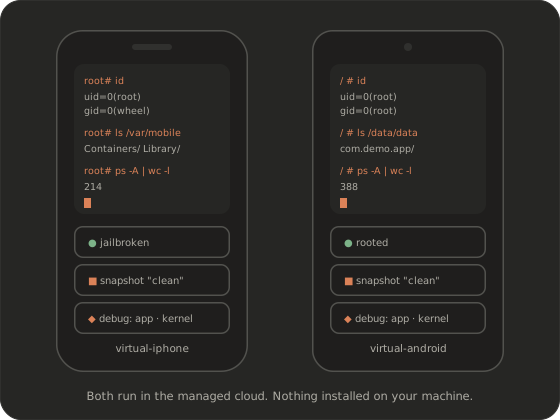
Virtual iPhone and Android devices
Real operating systems on virtual hardware, running in our cloud, not apps on a simulator.
Each device is a virtual iOS or Android device that runs in our managed cloud. iOS devices come jailbroken. Android devices come rooted. You get the access you’d set up on a research phone, without buying the phone, finding a usable OS version or keeping a jailbreak alive between updates.
You create and control devices the way that suits the job: hands-on with your own research tools, from code through the API, or through the MCP server, so an AI agent can do the driving.
Jailbroken iOS on virtual iPhones, for research that needs full system access.
Rooted Android on virtual Android devices, for system-level work from the start.
OS versions and device models on request. We don’t publish a version list on the site. Tell us which iOS and Android versions your work depends on, and we’ll confirm what we can support in the demo.
Jailbroken iPhone and rooted Android in the cloud
Root access is where the device starts, not a weekend project.
Jailbreak on iOS and root on Android are part of the device, so you begin with root access instead of working toward it. You don’t run jailbreak tooling, keep a phone on an old OS version or wait for a jailbreak to catch up with an update. Open a root shell, install your tools and get to the actual research: the app’s sandbox, system processes, the file system and the kernel underneath.
Because the device is virtual, a bad change costs nothing. Take a snapshot before you experiment and restore it when something breaks.
virtual-iphone:~ root# id
uid=0(root) gid=0(wheel)

virtual-android:/ # id
uid=0(root) gid=0(root)
Security research tools built into every device
The capabilities you’d assemble by hand on a research phone, ready on every virtual device.
Snapshots
Save a device’s complete state, restore it in one step, or clone it to explore a second path from the same point. Reproducible experiments stop depending on careful notes.
Traffic inspection
See the network traffic an app sends and receives while you use it, so you can check what leaves the device, where it goes and when.
Kernel debugging
Debug the kernel of a virtual iOS or Android device. That’s the starting point for vulnerability research that can’t stop at the app layer.
App debugging
Attach to the app under test and step through its behaviour at runtime, on a device with full root access.
File system and processes
Browse the device’s file system and inspect running processes, including what an app writes to its own container and what else is running alongside it.
System introspection
Look at system-level behaviour as well as the app: the operating system activity that a physical phone usually keeps out of reach.
Your own tools
Bring the research tools you already rely on. Common mobile research tooling works on the devices, and we confirm your specific toolchain in the demo.
Snapshots, restore and clone
Make every experiment reproducible.
Get a device into a known state, take a snapshot and run your test. When you’re done, or when something breaks, restore the snapshot and you’re back where you started. Clone a snapshot to try two approaches side by side from exactly the same point. For malware analysis, that means each sample starts on a clean device. For AI agents, it means every attempt starts from the same snapshot, so a result can be replayed and checked.
Malware analysis on clean snapshots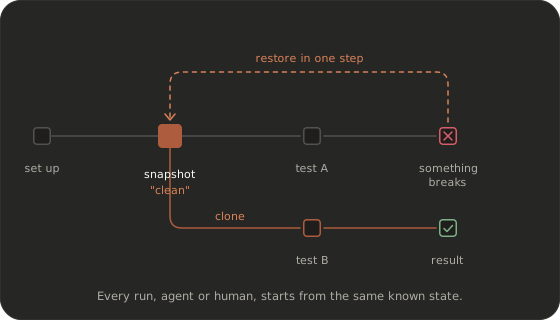
Control devices hands-on, by API, over MCP or from CI
One device, four ways in.
Hands-on
Work on the device directly with your own research tools when the task needs a human.
API and SDKs
Script device lifecycle, apps and snapshots from code through a REST API with Python and JavaScript SDKs. See the API overview.
MCP server
Give an MCP-capable AI client the devices as tools, and let our agents or your own client drive the testing. See AI agents and MCP.
CI
Call the API from your pipeline to run security checks and agent scenarios on virtual devices with every build. See agents in CI.
Managed cloud vs. DIY virtual iPhone
| Capability | Physical jailbroken device | DIY virtual iPhone on your Mac | Simulator / emulator | recuritylab |
|---|---|---|---|---|
| Jailbreak / root available | Depends on device and iOS version | Yes, iOS | Root on some Android emulator images; no iOS jailbreak | Yes, iOS and Android |
| iOS and Android | Separate devices | iOS only | Separate tools | Yes, one platform |
| Needs a local Apple Silicon Mac | No | Yes, with macOS 15 or later | iOS Simulator needs a Mac | No |
| Needs SIP/AMFI changes on the host | No | Yes | No | No |
| Snapshots | No | Possible, managed by you | Emulator snapshots; limited on the Simulator | Yes: save, restore, clone |
| CI-ready | Possible with a device lab | Not built for automated pipelines | Yes, on your own runners | Yes, through the API |
| AI agents / MCP | Bring your own | Varies by project | IDE assistants or third-party MCP servers | Built in |
Open-source DIY setups are a great way to learn, and they’ve made virtual iPhones far more accessible. When a team needs iOS and Android, repeatable devices, and nothing to maintain on its own Macs, a managed platform is the better fit. One honest note: virtual devices don’t replace physical phones for every job. If your research depends on specific hardware behaviour, tell us what you need and we’ll tell you plainly whether it fits.
Isolated by design
Every device is a virtual machine, isolated from your own workstation and network, and it can be reverted to a clean snapshot or deleted when the work is done. Devices run in our managed cloud. If your organisation needs a different deployment model, tell us your requirements and we’ll talk them through.
Frequently asked questions
Is a jailbroken virtual iPhone a real jailbreak, or a simulator?
It’s not a simulator. A simulator runs apps built for your Mac on top of simulator frameworks, so there’s no device operating system or kernel to inspect. A jailbroken virtual iPhone runs iOS itself on virtual hardware in the cloud, with root access, so you can examine the system, the app’s sandbox and the kernel the way you would on a jailbroken phone.
Which iOS and Android versions and devices are available?
We don’t publish a version or model list on the site. Tell us which iOS and Android versions your work depends on when you book a demo, and we’ll tell you plainly what we can support today.
Do I need a Mac?
No. The devices run in our managed cloud, so there’s no Apple Silicon Mac to dedicate, no SIP or AMFI changes to your machine and no restore loops to babysit. You work with the devices hands-on, through the API or through an MCP-capable AI client.
Can I use Frida, Burp or my own tools?
Common mobile research tooling works on the devices, and root access means you install and run what your workflow needs. Tool support changes with versions and setups, so we don’t publish a list on the site. Tell us your exact toolchain and we’ll confirm it in the demo.
Can I root Android in the cloud and change system settings?
Android devices come rooted, so you have system-level access from the start. If your work depends on specific low-level settings, such as SELinux configuration, raise it when you book a demo and we’ll confirm what’s possible for your setup.
Is it legal to use a jailbroken virtual iPhone for security research?
Virtual iOS research tools have been the subject of litigation in the US, and the law differs between countries. Whether a specific project is lawful depends on what you test, on whose behalf and where. This isn’t legal advice: check with your counsel. Every account is reviewed, and use is governed by our acceptable use policy.
How do I get access?
There’s no self-serve signup and no public pricing. Book a demo, tell us what you want to research or test, and we’ll review the request and set up access that fits your team, including an evaluation if you need one. Book a demo.
Book a demo
A jailbroken iPhone and rooted Android in the cloud, ready for your tools and your AI agents. Access is by request.
Book a demo