Mobile malware analysis sandbox for iOS and Android, with AI agents
Run suspicious apps on isolated virtual iOS and Android devices. Watch what they do, keep every artifact, and let AI agents handle the interaction and evidence capture.
Built for defensive threat research: a mobile malware analysis sandbox where every run starts clean and can be repeated from the same starting point.
Access is reviewed. Defensive use only.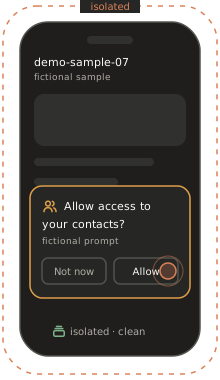
Why mobile malware is hard to analyse
The sample is rarely the hard part. The environment is.
iOS is locked down.
iOS malware analysis needs a level of access that ordinary phones don’t give you.
Analysis phones are scarce and hard to trust.
Physical devices are slow to reset, and reusing one after a suspicious sample is a risk in itself.
Behaviour hides behind interaction.
Many samples show nothing until someone signs up, taps through prompts or uses the app for a while.
Evidence is scattered.
Files, traffic, logs and screens all tell part of the story. An Android malware sandbox that covers only one of them leaves you stitching the rest together by hand.
Isolated by design
The first question is “can it hurt us?” The sandbox is built around that question.
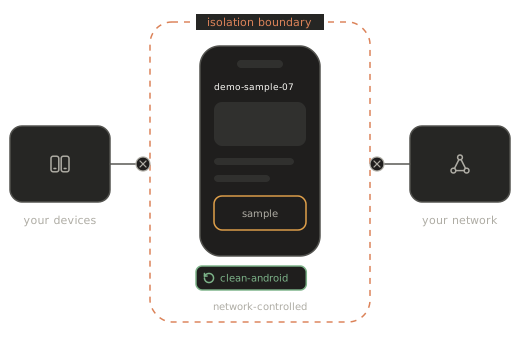
Samples run on virtual devices, not on your real phones or your workstation. Analysis runs happen in network-controlled environments, and every run can start from a clean snapshot and return to it afterwards, so nothing from one run carries over into the next. Isolation details, and how they fit your own requirements, are covered on our security page and in the demo.
- Virtual devices, separate from your real devices
- Network-controlled environments for analysis runs
- Back to a clean snapshot after every run
What you can observe in a mobile malware analysis
Six views of one run, for static and dynamic analysis side by side.
Runtime behaviour.
What the app starts, accesses and asks for while it runs.
Files and data.
What it writes, changes or reads on the device.
Network traffic.
Network traffic monitoring shows where the app connects and what it sends.
System activity.
Process and system-level activity, down to the kernel.
Screens.
What a user would have seen at each point of the run.
The app package.
Inspect the package with your own static tools alongside the dynamic runs.
How an analysis runs
Five stages of mobile malware analysis, from clean device to report.
Each stage is an outcome, not a procedure. Because the device is virtual, the whole run can be repeated from the same starting point.

Start clean.
A fresh iOS or Android virtual device starts from a known snapshot, so nothing left over from a previous run skews the result.
Load the sample.
Bring in the app under analysis without touching a real phone.
Interact like a user.
An agent, or an analyst, uses the app the way a target would, so behaviour that waits for interaction has a chance to appear.
Collect the evidence.
Behaviour, traffic, file changes and screens are gathered from the same run.
Report, rewind, rerun.
Get a report with indicators, then roll back and run again under different conditions.
AI agents that play the victim
Some samples only show their hand to a user. The agent can be that user.
recuritylab has an MCP server and an API built in, so an AI agent can operate the virtual device: tap through onboarding, answer permission prompts, and use the app the way a target would. That interaction is what makes automated malware analysis useful on mobile. You give the brief in plain language:
“Open the app, go through setup as a new user, use it for five minutes, and summarise every network destination and permission it asked for.”
The agent runs the session, collects the evidence and drafts the analysis summary. The analyst reviews it, digs further where it matters, and draws the conclusions.
The agent
- user-like interaction
- evidence capture
- first-pass summary
The analyst
- interpretation
- classification
- response and reporting
Evidence, indicators and reporting
One report your detection and response teams can use.
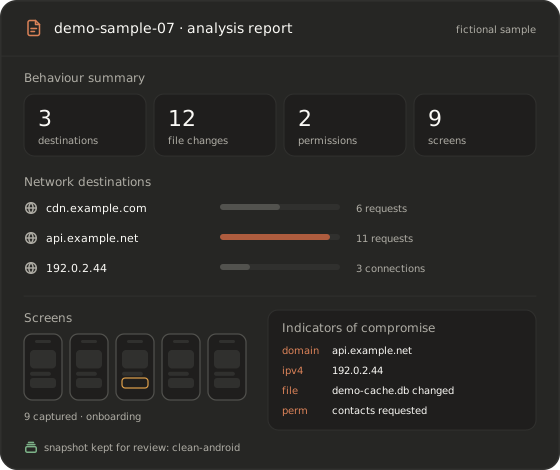
Each run produces a malware analysis report that brings the evidence together: a behaviour summary, network destinations, file and data changes, screenshots, and indicators of compromise (IoCs) for your detection and response work. The snapshot behind the run stays available, so you can return to the exact device state when a question comes up. Need the output in the tools you already use? Ask us about exporting it.
- Behaviour summary and network destinations
- File and data changes, with screenshots
- Indicators of compromise ready for your team
- The snapshot behind every run
Who uses it
Teams that need to know what a mobile app really does.
Threat intelligence teams.
Mobile threat research on iOS and Android samples, with evidence you can share internally.
SOC and incident response.
Analyse the app behind a mobile incident without risking another device.
Mobile security vendors.
Validate that detections fire on the behaviour they are meant to catch.
Investigators protecting at-risk users.
Mobile spyware analysis on behalf of journalists, NGOs and others at risk, always with the consent of the device owner.
Testing apps your own organisation builds? See app pentesting. Training analysts? See training.
Physical-device sandboxes vs virtual devices
Where a virtual malware sandbox fits.
Physical phones give real hardware but are slow to reset and hard to scale. An emulator-based sandbox scales well but covers Android only. The table compares categories, not vendors.
| iOS coverage | Android coverage | Reset to a clean state | Parallel runs | User-like interaction | Deep system visibility | |
|---|---|---|---|---|---|---|
| Physical analysis phones | Yes, with the right devices | Yes, with the right devices | Manual and slow | Limited by hardware | Manual or scripted | Depends on access level |
| Emulator-based Android sandboxes | No | Yes | Yes | Yes | Scripted | Varies |
| recuritylab virtual devices | Yes | Yes | Snapshots | Ask us | AI agents + MCP | System and kernel introspection |
Deployment and data handling
Many threat teams can’t send samples to a shared cloud. recuritylab offers flexible deployment options, including isolated environments — ask us. Tell us where samples and artifacts must stay, and we’ll discuss the setup that meets that requirement.
SecurityDefensive use only
recuritylab is for analysing threats in order to protect users and organisations. Every account starts with a demo and a review of the request, samples are handled under our acceptable use policy, and the platform may not be used to develop, improve or distribute malware. We may decline requests that don’t fit.
Acceptable use policyFAQ
What is a mobile malware analysis sandbox for iOS and Android?
It is an isolated, observable environment where a suspicious mobile app can run without putting real devices or networks at risk. recuritylab provides virtual iOS and Android devices for this, with snapshots to start every run clean, visibility into behaviour, files, traffic and system activity, and AI agents that interact with the app and draft the report.
Can I analyse iOS malware without a physical iPhone?
Yes. Analysis runs on virtual iOS devices with the access level analysis requires, so you don’t need to source, prepare or reset physical iPhones.
Does it support Android too?
Yes. iOS and Android samples run on the same platform, with the same snapshots, agents, evidence collection and reports.
Is the sample isolated from my network?
Samples run on virtual devices in network-controlled environments, separate from your real devices, and every run can start from a clean snapshot. For the isolation and deployment your policy requires, see our security page and ask us in the demo.
What does the report include?
A behaviour summary, network destinations, file and data changes, screenshots, and indicators of compromise, with the snapshot behind the run kept for later review. Ask us about exporting results to the tools you already use.
Can AI agents interact with the app like a user?
Yes. Agents operate the device over the built-in MCP server or the API: they go through onboarding, respond to prompts and use the app as a target would, then summarise what happened. An analyst reviews the result and draws the conclusions.
How do I get access?
Book a demo. Every request is reviewed, and use is governed by our acceptable use policy. There is no self-serve signup and no published pricing.
See what a suspicious app really does, safely
Access is on request and set up after a demo. We don’t publish pricing.
Book a demo