Mobile app penetration testing platform with AI agents built in
Test iOS and Android apps on jailbroken and rooted virtual devices in the cloud, with no phone lab to maintain. AI agents run the repeatable checks while you drive the deep work.
A mobile app penetration testing platform, not another service: you get the device, the visibility and an agent beside you.
Access is reviewed. Authorized security testing only.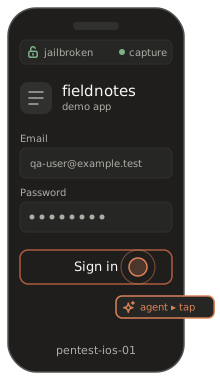
Why mobile pentests stall
The hard part of mobile app pentesting is often everything before the first finding.
The right device is never on the shelf.
Finding a phone on the OS version the app targets, and keeping it there, can eat the first day of an engagement.
Jailbreak and root lag behind.
On physical hardware, a jailbroken iPhone or a rooted Android device for a new OS release often arrives late, and sometimes not at all.
Every test starts with setup.
Wiping devices, reinstalling tools and re-seeding test accounts between apps is work nobody budgets for.
Baseline checks eat the budget.
The same storage, traffic and configuration checks run on every app, leaving fewer hours for the issues that need a human.
How a mobile app penetration test runs here
Six steps from a fresh device to a retest, with the agent taking the repeatable part.
Every step runs on a virtual device you control, so you can stop, inspect and rewind at any point. The platform overview covers the environment itself.

Start a research-ready device.
Spin up a jailbroken iOS or rooted Android virtual device in the cloud. There is no hardware to buy, flash or pass around.
Install the build under test.
Load the IPA or APK you are authorized to test. Snapshot the clean install so you can always return to it.
Let an agent run the baseline pass.
An AI agent connected over MCP or the API works through the repeatable checks you describe in plain English. It captures evidence as it goes, so the baseline doesn’t depend on someone’s memory.
Investigate what matters.
Inspect traffic, files, processes and runtime behaviour, and debug the app on a device you can fully inspect. Pair the agent’s dynamic pass with your own static tooling for static and dynamic analysis side by side.
Snapshot, rewind, branch.
Save the interesting state, roll back after a test that changes it, or branch to try a variation. Nothing has to be rebuilt from scratch.
Report and retest.
Review the auto-generated draft report with evidence attached. After the fix, rerun the same scenario against the new build.
An AI agent beside the pentester
It takes the checklist. You keep the judgment.
recuritylab has an MCP server and an API built in, so an AI agent can control the virtual device directly: it sees the screen, drives the app, reads device state and collects evidence. You describe the task the way you would brief a junior tester:
“Log in with the test account, capture every request that carries the session token, and flag any sent over cleartext.”
The agent works through the flow on a device you can open and inspect at any point. What comes back is an automated mobile pentest baseline, not an automated pentester. Logic flaws, chained issues and severity calls stay with you.
The agent
- repeatable baseline checks
- walking long app flows
- capturing requests, screenshots and device state
- drafting findings for review
You
- business logic
- chaining issues together
- deciding what is real and what matters
- the conversation with the app team
What you can test: OWASP MASVS coverage on iOS and Android
Plan iOS app penetration testing and Android app penetration testing scope against the control groups your clients already use.
OWASP MASVS sets out what a secure mobile app should do; OWASP MASTG describes how testers verify it. The table shows where the environment helps in each control group. It is a planning aid, not a certification or a claim of formal MASVS compliance.
| Control group | What you check (iOS · Android) | How the platform helps |
|---|---|---|
| Storage | Sensitive data in Keychain, files, caches and logs · shared preferences, databases and external storage | Full file-system access on a jailbroken or rooted device; snapshot the state after a flow to review it later |
| Crypto | How keys are created, stored and used on each platform | Observe the app at runtime with your own instrumentation on a device with full access |
| Auth | Session handling, token storage, logout and re-login behaviour | The agent repeats login flows with test accounts; snapshots return you to the same signed-in state |
| Network | App Transport Security settings · network security configuration; TLS and certificate validation | Network traffic monitoring on the device, so you see what the app really sends |
| Platform | URL schemes, universal links, WebViews · intents, content providers, exported components, WebViews | Exercise each entry point on a device you control; the agent can walk the app to reach them |
| Code | Debug settings, third-party components, input handling | Inspect the app package with your static tools and debug the running app |
| Resilience | Jailbreak detection · root detection, tamper response | Check how detection behaves on a device that really is jailbroken or rooted |
| Privacy | What data the app collects and where it goes | Traffic and storage views show what leaves the device, flow by flow |
Works with your toolkit
Your tools, on a device that doesn’t fight you.
Because devices come jailbroken or rooted, getting your own tooling onto them is not a project. Bring the proxy, instrumentation framework, debugger, disassembler and scripts you already trust, and use them next to the agent rather than instead of it. Want to check a specific tool or workflow? Bring it to the demo and we’ll go through it with you.
- Intercept and inspect traffic with your usual proxy
- Instrument and debug the running app
- Pull files and inspect the app package with your static tools
- Script anything repetitive, or hand it to the agent
Evidence and reporting
The deliverable starts writing itself while you test.
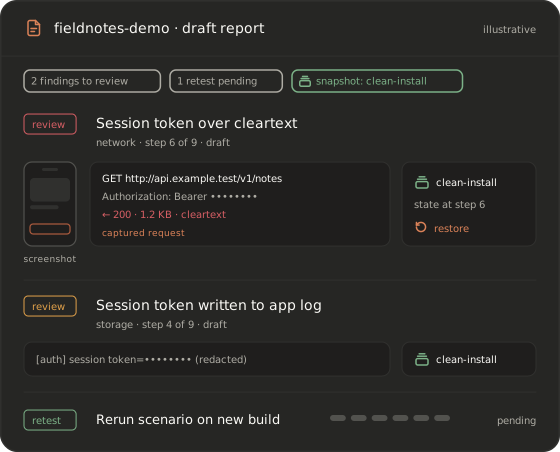
Every agent run produces a draft mobile pentest report. Each finding carries its evidence: the captured requests, screenshots of the screens involved, and a reference to the snapshot behind it, so a reviewer can return to the exact device state. You confirm, edit or reject each finding before anything leaves your hands. When the client ships a fix, rerun the same scenario on the new build and attach the result to the retest. Ask us how reports fit your delivery template.
- Findings drafted with evidence attached
- Snapshot reference for every finding
- Rerun the scenario to verify a fix
Built for teams and repeat engagements
The second test of an app should be faster than the first.
Keep a snapshot of a configured app as the baseline for that client, and clone it for every retest. Save the agent scenarios that worked, then run them again on each release so mobile application security testing becomes a routine, not an event. When a check should run on every build, move it into the pipeline. Team access and roles are set up with you after the demo.
Run security checks in CI- Snapshots as reusable test baselines
- The same agent scenario, release after release
- A clear path from engagement to CI
Platform vs device labs, emulators and services
Where a virtual device platform fits next to the options you already know.
Each option has a place. A platform does not replace an experienced tester, and an outsourced team can run its engagement on one too. The table compares categories, not vendors. For deeper comparisons, see iOS Simulator and Android emulator. Going below the app, into the OS itself? See vulnerability research.
| Jailbreak / root access | Device fidelity | Time to a ready device | Repeatability | Automation / agents | Human expertise needed | |
|---|---|---|---|---|---|---|
| Physical device lab | Depends on model and OS release | Real hardware | Procurement and setup | Manual reset | Bring your own | Yes |
| Simulators and emulators | Limited | An approximation of a device | Quick on a workstation | Partial | Bring your own | Yes |
| MAST scanners | Not exposed to the tester | Varies by tool | Upload and scan | Rescan per build | Automated rules | To validate results |
| Outsourced pentest service | In the provider’s lab | In the provider’s lab | Scheduling and scoping | Per engagement | Provider’s choice | Supplied by the service |
| recuritylab virtual devices | Jailbroken and rooted devices ready | Virtual iOS and Android devices | Ask us | Snapshots and clones | AI agents + MCP built in | Yes, for the work that needs judgment |
Authorized testing only
recuritylab is for testing apps you own or are authorized to test. Every account starts with a demo and a review of the request, and use is governed by our acceptable use policy. We may decline requests that don’t fit it.
Acceptable use policyFAQ
What is a mobile app penetration testing platform?
It is the environment a tester works in: ready iOS and Android devices with full access, visibility into traffic, files and processes, and ways to repeat work. recuritylab provides jailbroken and rooted virtual devices with snapshots, plus AI agents and MCP built in, so the repeatable part of a test runs while you focus on the findings.
How is it different from a mobile pentest service?
A service sells testers’ time and delivers a report. A platform gives your own team, or your consultancy, the devices and automation to run the test. Many teams use both: an outside firm can run its engagement on recuritylab, and in-house AppSec can rerun the same checks between engagements.
Can I test iOS and Android apps in one place?
Yes. You work with virtual iOS and Android devices on the same platform, with the same snapshots, agents and API. Tell us which OS releases your test plans need, and we’ll cover it in the demo.
Do I need a jailbroken iPhone or a rooted Android phone?
No. Devices on recuritylab come jailbroken or rooted when your test needs it, so you don’t have to source, prepare or maintain physical phones for it.
Can an AI agent replace a pentester?
No. The agent handles the repeatable part: baseline checks, long app flows, evidence capture and a draft report. Business logic, chaining issues together and deciding what matters still need an experienced tester. The point is to give that person more hours for exactly that work.
Does it follow OWASP MASTG?
The environment supports the kinds of tests OWASP MASTG describes, across all OWASP MASVS control groups, and you can describe MASTG-style checks to the agent in plain English. recuritylab itself is not certified against MASVS, and a platform doesn’t make an app compliant. The tester still owns the methodology.
How do I get access?
Book a demo. We review every request, then set up access that fits your team. There is no self-serve signup and no published pricing.
Put an AI agent beside your next mobile pentest
Access is on request and set up after a demo. We don’t publish pricing.
Book a demo