An isolated environment for mobile app security testing
Virtual iOS and Android devices built to protect what you bring (app binaries, credentials, traffic) and to contain what runs inside: malware samples, exploit code and AI agents. This page sets out how, plainly.
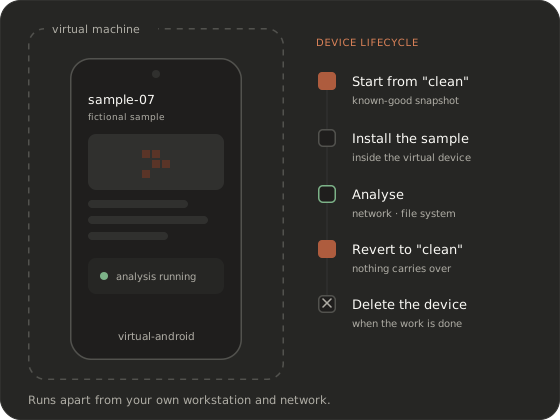 Illustrative session with a fictional sample.
 How isolation works
Virtual devices change the question from “was this phone wiped?” to “this device can be destroyed.”
Every device on the platform is a virtual machine: a sandbox for the app under test that runs apart from your own workstation and network. That gives you a property physical device labs can’t offer. A device doesn’t have to be scrubbed between projects and trusted to be clean. You can restore it to a known-good snapshot in one step, or delete it when the work is done. That’s what makes it an isolated environment you can reason about, not a shared phone with a cleanup checklist.
Contain malware, exploits and AI agents
Security research means running things you wouldn’t run anywhere else.
Malware analysis and vulnerability research are core use cases of the platform. The first line of containment is the virtual device itself. Each sample can start on a clean snapshot and the device can be reverted afterwards, so nothing carries over to the next run. AI agents work through the platform on your virtual devices, the same way a researcher does.
Your side of the arrangement: you’re responsible for using the platform lawfully, for having authorization for what you test, and for handling samples responsibly. Our acceptable use policy sets out the rules.
Malware analysis use caseAccess control and audit logs
Access starts with a reviewed request. Nobody gets an account or API credentials from a signup form. API and MCP credentials are issued to your team once access is granted. How they’re managed is covered in the product docs, and we go through it with your security team; the API overview explains how access works.
API authentication overviewCompliance
We don’t list certifications on this page. If your review depends on specific attestations, a security questionnaire or a data processing agreement, raise it when you book a demo. We’ll answer it directly, before you upload anything.
Deployment options
Devices run in our managed cloud. If your data has to stay in a dedicated environment, on your premises or in an air-gapped network, tell us your requirements. We’ll discuss what’s possible for your organisation before any commitment.
Lawful use
This is a platform for defensive security work, and we’re selective about who uses it. Every request is reviewed before access is granted, and we can decline any request. In short, you may test only apps, devices and systems you own or are explicitly authorized to test. The platform may not be used for unauthorized access or interference, for building or spreading malware or spyware outside defensive research, or for surveillance of individuals. The same rules apply to AI agents and automation acting on your behalf.
Acceptable use policyFrequently asked questions
How do I delete everything?
You can delete devices and restore snapshots yourself at any time.
Can I run live malware in this isolated environment?
Malware analysis is one of the core use cases, and each sample can start on a clean snapshot that you revert afterwards. Use must stay within our acceptable use policy: defensive research, with samples handled responsibly.
Do you support on-prem or air-gapped deployment?
Devices run in our managed cloud. If you need a dedicated, on-premises or air-gapped setup, tell us your requirements when you book a demo and we’ll discuss what’s possible. See enterprise and government for how those conversations usually start.
How do I get your security documentation?
Book a demo and tell us what your security review requires: questionnaires, attestations, architecture questions. We’ll answer directly and tell you what we can share. Book a demo.
Book a demo
Talk to us about isolation and data handling before you upload a single binary. We’ll take your security team through it.
Book a demo