API for virtual Android and iOS devices: automation for security teams
Create, control, snapshot and inspect rooted Android and jailbroken iOS virtual devices from code, through REST, SDKs, MCP and webhooks. The full reference is available to customers once access is granted.
What you can automate on virtual devices
Script the core device workflow from code, on Android and iOS alike.
Device lifecycle
Create, start, stop and delete virtual Android and iOS devices from code.
Research-ready devices
Work with rooted Android and jailbroken iOS devices, the same ones researchers use by hand on the platform.
Apps
Install and launch the app under test as part of a script.
Snapshots
Save, restore and clone device state so every automated run starts clean.
Traffic
Retrieve the network traffic captured during a run for your own analysis.
CI automation
Put all of the above in a pipeline and run it on every build.
Example
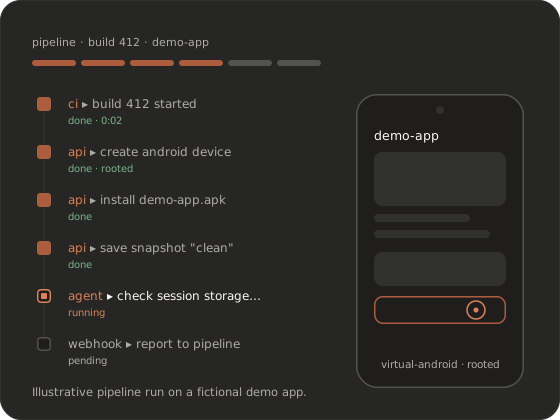
A minimal flow: authenticate, create a rooted virtual Android device, install an app, save a clean snapshot and hand the device to an agent.
# Illustrative only. The real API is documented after access.
client = connect(load_credentials())

device = client.create_device("android")   # rooted virtual Android device
device.install_app("demo-app.apk")
device.save_snapshot("clean")

report = client.run_agent(device, "Check how the app stores session data")
print(report.summary())
REST API, SDKs, MCP and webhooks
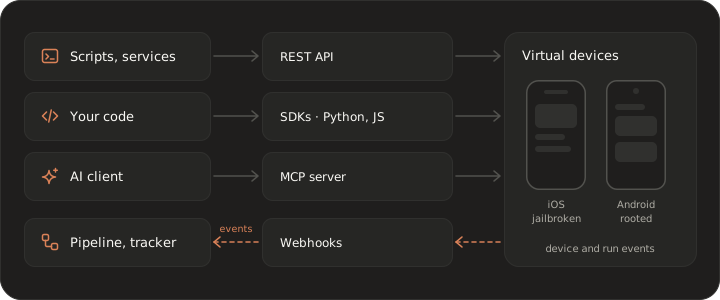
Pick the interface that matches who, or what, is doing the work.
REST API
The base interface for scripts, services and your own tools.
Python and JavaScript SDKs
Client libraries for Python and JavaScript, so you don’t hand-roll requests.
MCP server
Gives MCP-capable AI clients the devices as tools, so an agent can operate a jailbroken or rooted device directly. See AI agents and MCP.
Webhooks
Get notified about device and run events instead of polling, and feed results to your pipeline or tracker.
 AI agents and MCP
 Authentication and access
Security engineers ask this first, so here’s where we stand.
API and MCP access is issued to your team after your request has been reviewed. Nobody gets credentials from a signup form. How clients authenticate and how credentials are scoped and managed are documented in the reference, and we go through them with your security team in the demo. Bring your requirements, such as scoping per project or integration with your secrets management, and we’ll tell you how they map.
Security and data handlingAutomate virtual devices in CI
Security checks that run with every build, not once before release.
Wire the API into your CI/CD pipeline and each build can run security checks or an agent scenario on fresh virtual devices restored from a known snapshot. Results come back through the API and webhooks, so a pipeline step can read the report, attach the evidence and decide whether the build moves on. Tell us which CI system you run when you book a demo.
Agents in CIGetting the full API reference
The full API reference, SDK documentation and MCP setup guide are part of the product docs, available to customers after access is granted. They’re not published on this site. For an outline of what the docs cover, see the docs overview. To get access, book a demo. We review every request.
Frequently asked questions
Is the virtual device API public?
No. This page is an overview. The full reference, SDK docs and MCP setup guide are available to customers once access is granted, after a demo and a review of the request.
Which languages have SDKs?
Python and JavaScript. Anything else can call the REST API directly. Package details and supported language versions are in the product docs.
Can I automate both a virtual Android device and a virtual iPhone with one API?
Yes. Virtual Android and iOS devices are managed through the same API, so one script or pipeline can create, snapshot and inspect both and run the same scenario on each.
Can an AI agent use the API?
Yes. Agents connect through the MCP server, which exposes the devices to MCP-capable AI clients as tools. Our built-in agents can also be started from the API. See AI agents and MCP.
Are there rate limits?
Usage limits are described in the API reference, available after access. If you plan heavy parallel automation, mention it when you book a demo so access is set up to match.